The webcam app made for online teachers.
TeacherTeacher Cam is a virtual camera for Windows. It works as the camera in your class app and adds a classroom background, teaching props, fun face filters, effects and your name banner to your picture, with no green screen needed.
The Cam is in a private beta. Plans open when the free beta ends; at launch every teacher gets the full Pro edition free until a date we announce.

What the Cam does
Works in your class app
Choose "TeacherTeacher Cam" as the camera in your class or video app, the way you choose any webcam. Windows 10 and 11.
Backgrounds without a green screen
Automatic background replaces your room with a classroom, an office or a blur. A green-screen mode is there too, if you have one.
Teaching props
A large library of props: letters, numbers, animals, food, clothing, rewards and more, plus your own pictures. Hats and glasses follow your head.
Face filters that blink and smile
Cartoon face filters that follow your face, blink when you blink and grin when you smile.
Effects
Distortions such as snow, rain, confetti, bubbles, underwater and fireworks, to celebrate a right answer or set a scene.
Class-safe controls
Freeze your picture and mute in one click, a "Be right back" screen, a slim control bar beside your class, snapshots and recordings.
Real snapshots from the Cam



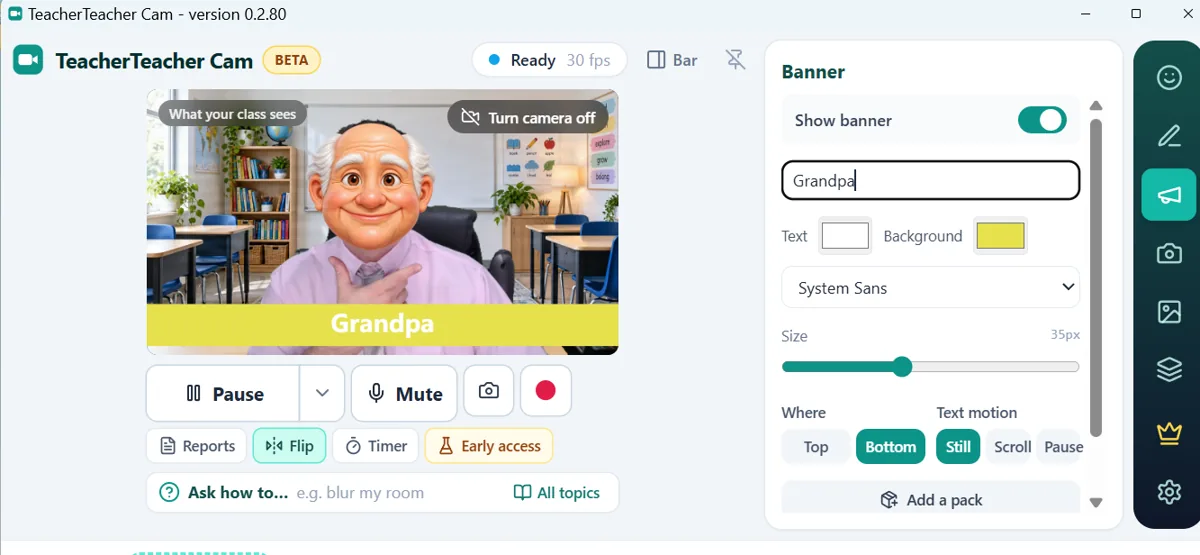
Real snapshots taken with TeacherTeacher Cam (Pro edition, so no watermark).
Plans
Every plan is the full Pro edition. The plans differ only in how many of your computers can use it. Prices are in US dollars per year, plus any applicable tax.
Free edition
$0
1 computer
- The camera in any class app
- Automatic background, Blur, Whiteboard and 2 background pictures
- A starter set of props and 3 of your own pictures
- Black and white and Matrix code effects
- A large TeacherTeacher watermark
Pro, 1 computer
$51.49
per year
- Everything in Free
- No watermark
- Access to the Pro Library: backgrounds, props and face filters included free (the selection changes over time)
- Your own pictures with no set limit
- Face filters, all effects, Look better
Pro, 3 computers
$72.49
per year
- Everything in Pro
- Use it on up to 3 of your computers
- About $24 per computer
Pro, 5 computers
$92.99
per year
- Everything in Pro
- Use it on up to 5 of your computers
- About $19 per computer
Pro pays for the Pro tools and access to the Pro Library. The pictures inside the library (backgrounds, props, face filters and more) are a free bonus: we add, change and retire them over time, so the selection changes. Everything you make yourself stays yours (Terms 7.5).
Plans renew automatically each year until you cancel. Cancel any time from the link in your plan emails; your plan keeps working until the end of the year you paid for. Full refund within 14 days of a purchase or renewal, for any reason (Refund Policy). Payments are processed by the payment provider named at checkout; we never receive or store your full card details (Terms B8).
Schools, academies and companies
Buying for a team? Get one yearly invoice for your organization's computers. The price per computer goes down in steps as the order grows: each step has its own price, so every added computer adds a little and the average keeps falling.
| Computers in the order | Price per computer, per year |
|---|---|
| Computers 1 to 10 | $18 |
| Computers 11 to 25 | $17 |
| Computers 26 to 50 | $16 |
| Computer 51 and up | $15 |
Minimum school order: 6 computers. Examples: 6 computers $108 a year; 10 computers $180; 25 computers $435 (about $17.40 each); 50 computers $835; 100 computers $1,585. Prices in US dollars per year, plus any applicable tax. The Pro edition on every computer; the same 14-day refund promise.
Email info@teacherteacher.xyz with your organization's name, country and number of computers. We will send a written quote with the total, the renewal price and the licence details. Ask about a pilot on your own teaching computers.